How do I use the Pill Identifier?
Open nakedcompound.in/tools/pill-identifier, tick the consent box, and pick one of three ways:
- Scan the code: photograph the QR code, DataMatrix or barcode on the strip or carton.
- Read the strip: photograph the printed side to read the generic name, batch, dates and warnings.
- Loose pill: no strip? Describe the tablet and get a note to show a pharmacist. It never guesses a tablet from its colour or shape.
Check the card against the pack, then save it as a PDF if you want. It's free, and your photos never leave your phone.
Free Pill Identifier. No app, no account, nothing uploaded.
Open the toolOn this page
Before you start
- A phone or laptop with a browser. Chrome, Safari, Edge or Firefox all work. There's no app to install.
- The strip or the carton. Codes are sometimes on the carton instead of the strip, so keep both if you have them.
- Good light. Daylight or a bright room. Foil strips reflect, so tilt them a little.
- A connection, the first time. The page loads its code reader and text reader once; after that the reading happens on your device.
Way 1
Scan the QR code or barcode
Since 1 August 2023, the 300 brands listed in Schedule H2 of the Drugs Rules, 1945 must carry a QR code or barcode, and in 2026 the government added vaccines, antimicrobials, anti-cancer and NDPS-covered drugs to that list, to be phased in.12 Many other brands print one too. Here's how to read it:
- Open the tool. Go to nakedcompound.in/tools/pill-identifier on your phone. There's nothing to install and no account.
- Pick “Scan the code”. It's the first tab. Tick the box that says you understand it only shows what's on the pack.
- Photograph the code. Tap Use camera, or choose a photo you already took. Fill most of the frame with the QR code, DataMatrix or barcode on the strip or carton.
- Tap “Read the code”. It takes under a second on most phones. Your medicine card appears below.
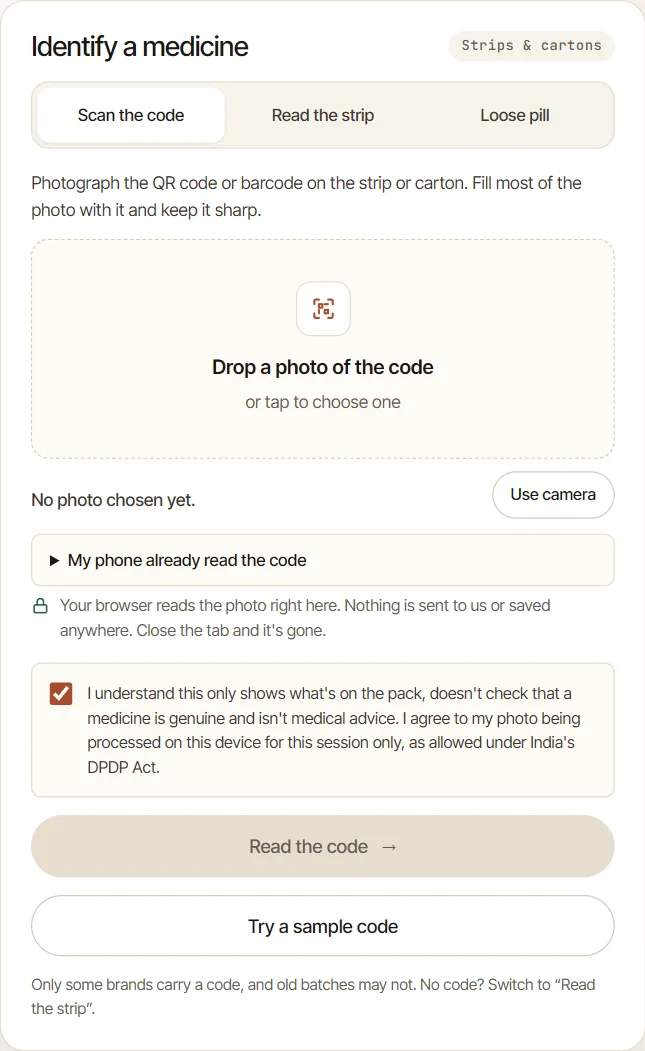
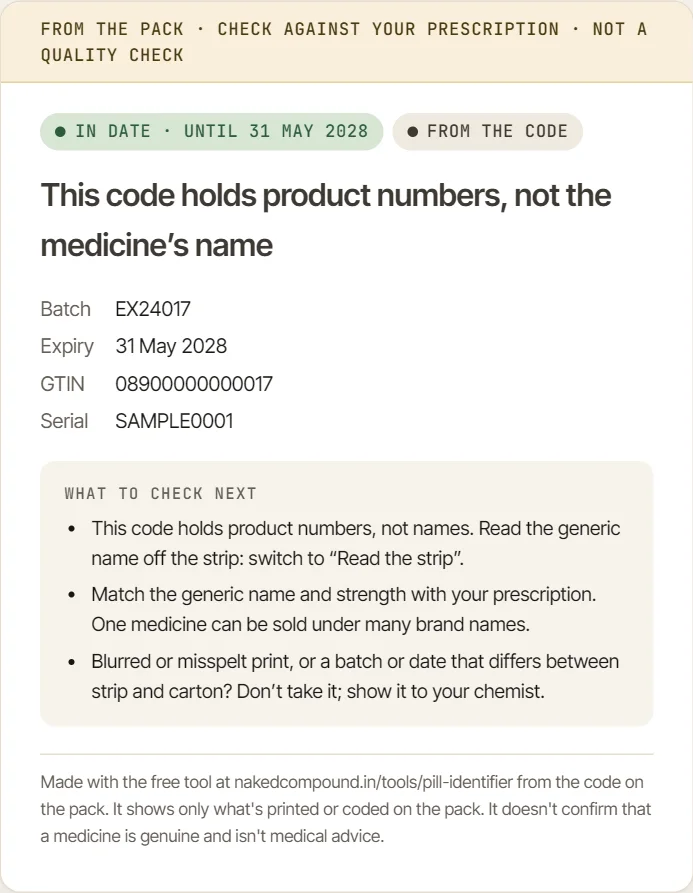
Tips if it says “No code found”: move closer so the code fills most of the photo, keep the phone still, and avoid glare across the code. If your phone's own camera app already reads the code, open “My phone already read the code” and paste the text it shows.
What the codes on Indian packs actually hold
We read the codes on 16 real medicine packs, from well-known brands to small ones, using photos from pharmacy listings and news reports. The tool read 15 of them. None had the medicine's name inside the code, and only 1 had the expiry date:
| What the code held | Packs | What you'll see |
|---|---|---|
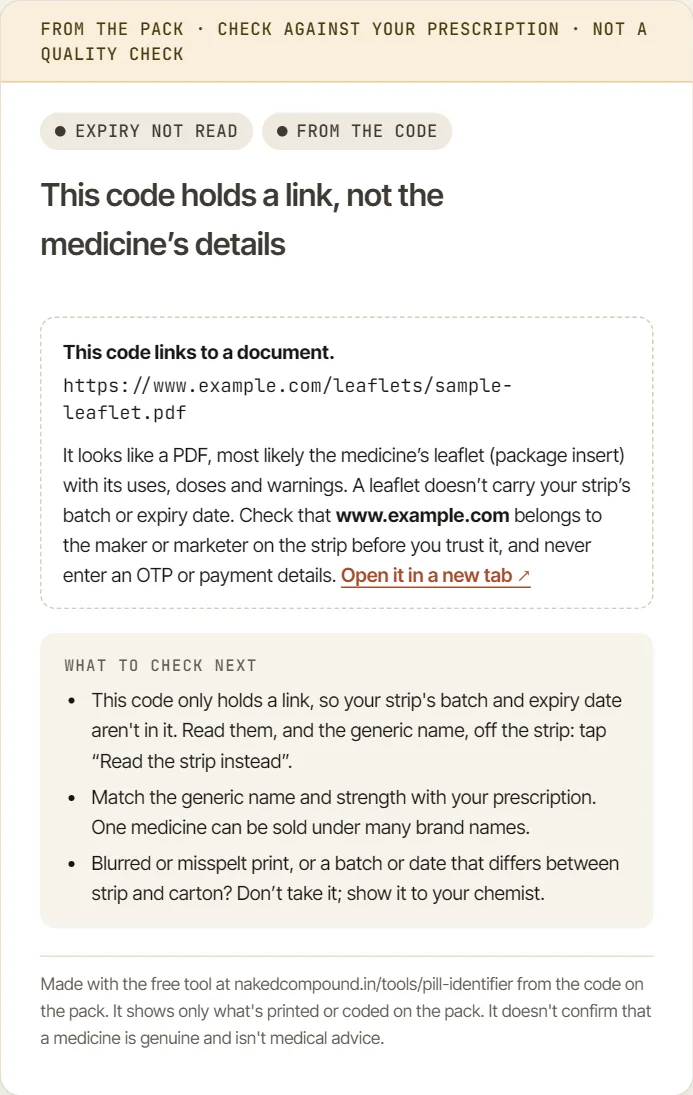
| A link to the maker's leaflet (a PDF) | 4 | “This code links to a document”, with the address. Tap it only if the website belongs to the maker on the strip. |
| A link to the maker's website or verification page | 4 | The link and its website name, never opened for you. |
| A link and a barcode side by side | 1 | Both, merged into one card. |
| Only numbers: barcode number, batch, serial, sometimes expiry | 6 | “This code holds product numbers, not the medicine's name”, with the numbers filled in. Dolo 650's carton code, for example, held its batch and a serial number. |
| Not readable (a website watermark across the code in the photo) | 1 | “No code found”. |
Tested on 16 October 2026. Codes can change from batch to batch, so yours may hold more, or less, than the pack we tested.
So for most medicines, the code tells you less than the strip does. When the code only holds a link or numbers, tap Read the strip instead on the card and photograph the printed side.
Way 2
Read the printed strip
Every strip sold in India has to show the generic name, batch, manufacturing and expiry dates, licence number, maker and MRP, so the printed side is the most reliable place to look. Our strip diagram shows where each one sits.
- Switch to “Read the strip”. The second tab. The first time, your browser downloads the free text reader (a few MB).
- Photograph the printed side. Lay the strip flat, in daylight or under a bright light, and tilt it slightly so the foil doesn't shine. Get the generic name, batch and dates in the frame.
- Tap “Read the strip”. A progress bar shows while it reads. It takes 10–30 seconds, depending on the phone.
- Check every field. Fix anything it misread in “Check the details”. The card on the right updates as you type.
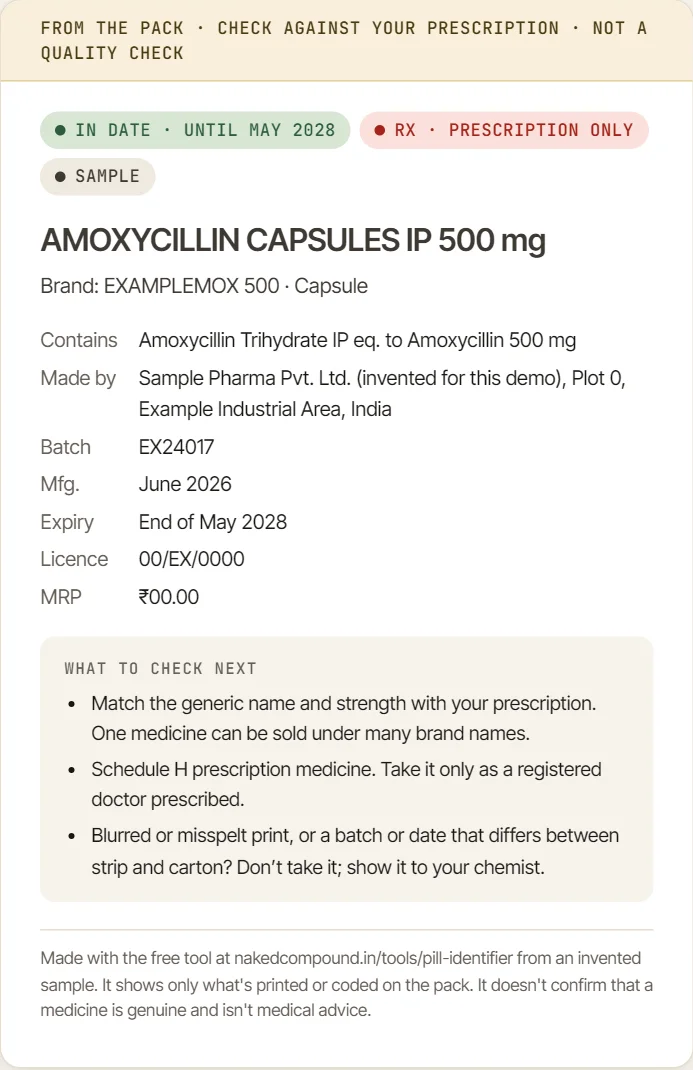
The text reader handles printed English text. It can misread small or faded print, so a wrong digit in a batch or date is possible. That's why every field stays editable and the card asks you to check it against the pack.
What the flags on the card mean
| Flag | Meaning |
|---|---|
| In date · until May 2028 | The expiry date is more than three months away. A month-only date means the end of that month. |
| Expires … | Expires within the next three months. |
| Expired | Past its expiry date. Don't take it; ask your pharmacist how to dispose of it. |
| Rx · Prescription only | The pack carries a Schedule H, H1, NRx or XRx warning. Take it only as a doctor prescribed. |
| Mfg. date in the future | Usually a misread digit. If the strip really says so, show it to the chemist. |
| Expiry before Mfg. date | The two dates don't make sense together. Check both on the strip. |
The tool can't see colours, so it won't spot the vertical red line printed on antibiotics and some other prescription strips. Look for that yourself: it means the medicine should only be taken on a doctor's advice.3
Check and save the card
- Match it with your prescription. Compare the generic name and strength, not the brand: one medicine is sold under many brand names.
- Compare strip and carton. The batch and dates should match on both.
- Tick “I've checked this card against the strip or carton”, then tap Save as PDF. Your phone's print screen opens; choose “Save as PDF”. The file stays on your device.
Keeping prescriptions too? Our free Prescription to Digital Record tool turns a paper prescription into a tidy PDF.
Way 3
A loose tablet with no strip
US pill identifiers work because US rules require a code stamped on each tablet, which they match against a database. We found no such database for medicines sold in India, and a plain white round tablet could be any of hundreds of medicines, so the tool doesn't guess. Instead it helps you describe the tablet for a pharmacist:
- Open the “Loose pill” tab and tap Describe the tablet.
- Note what you can see: anything printed or pressed on each side, the colour, shape, break line, surface and rough size. Add a photo if you like.
- Save or print the note and show it, with the tablet, to a pharmacist. Until then, don't take it, and keep it away from children.
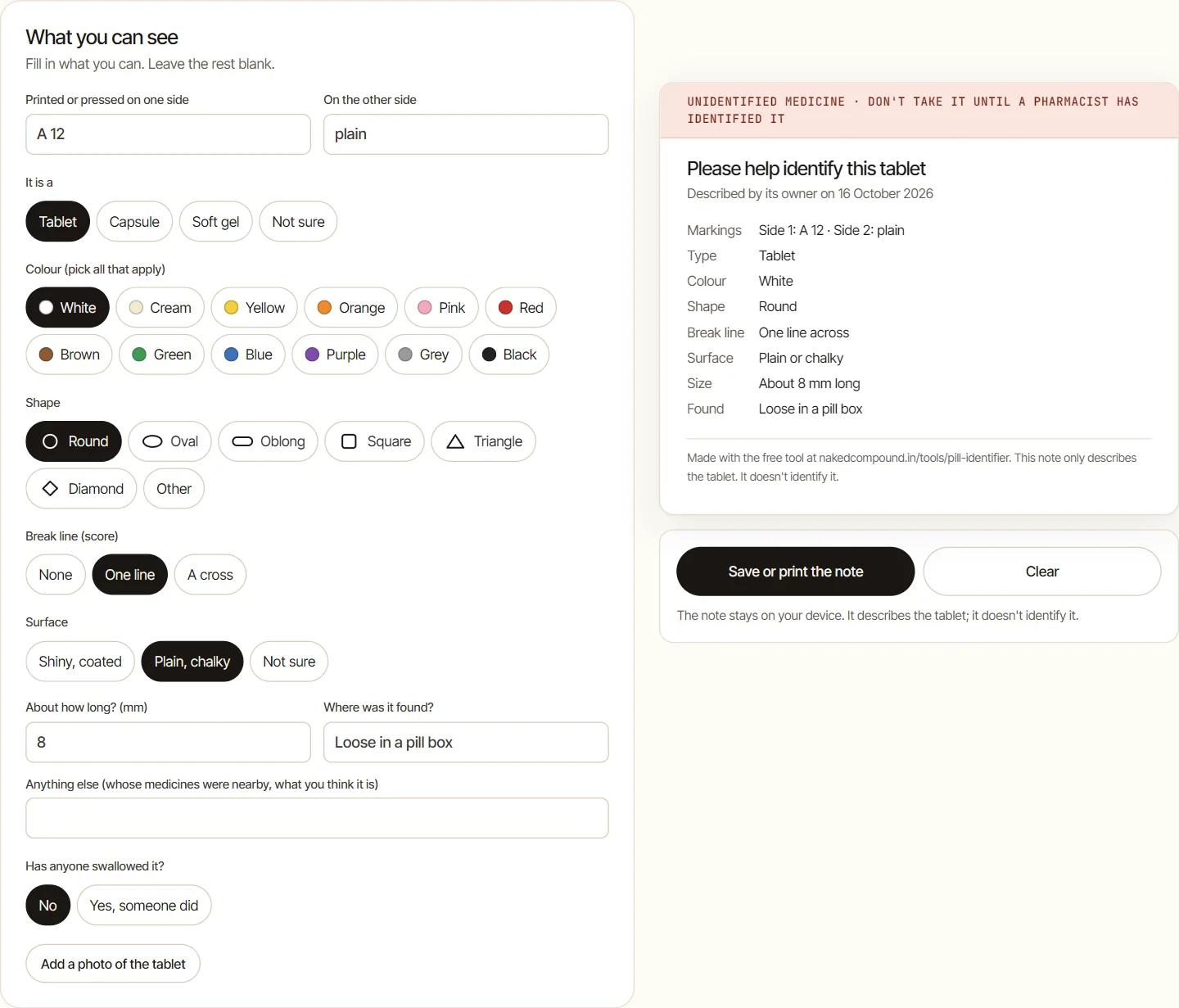
If someone has swallowed it: call the AIIMS National Poisons Information Centre on 1800 116 117 (toll-free, 24×7) or go to the nearest hospital with the tablet or pack. Don't wait for symptoms. If they are drowsy, struggling to breathe or have collapsed, call 112.4
What the Pill Identifier won't do
- It doesn't prove a medicine is genuine. A code can be copied onto a fake pack. It shows what's printed or coded; your chemist and the maker can check more. CDSCO's guidance explains how suspected fakes are checked.5
- It doesn't name a tablet from its looks. See Way 3.
- It doesn't open links for you. If a code links to a website, check the name belongs to the company on the strip, and never enter an OTP or payment details.
- It isn't medical advice. Don't start, stop or change a medicine because of the card. Ask your doctor or pharmacist.
Had a side effect from a medicine? You can report it to the Pharmacovigilance Programme of India on toll-free 1800 180 3024.6
Check the privacy claim yourself
Your photos are read inside your browser, by the open-source ZXing-C++ code reader and Tesseract.js text reader. To see that nothing is uploaded, open the tool on a laptop, press F12 and open the Network tab, then read a photo. You'll see the readers' code being downloaded, but no request that sends your photo anywhere.
Pill Identifier: FAQ
Is the Naked Compound Pill Identifier really free?
Yes. There is no sign-up, no limit on how many medicines you check, and no ads inside the tool.
Can it identify a loose tablet from its colour and shape?
No. There is no public database of tablet imprints for medicines sold in India, and many tablets look alike, so a guess could be dangerously wrong. Use the Loose pill tab to make a description note and show it to a pharmacist.
Why does my medicine's QR code only show a link?
Many Indian strips carry a QR code that links to the maker's website or leaflet instead of holding the details itself. In our test of 16 packs, none had the medicine's name inside the code. The tool shows the link but never opens it for you. Read the printed strip for the generic name, batch and expiry.
Does it work without the internet?
You need a connection the first time, to load the page and its code and text readers. After that, the reading happens on your phone and your photo is never sent anywhere.
Can it tell if my medicine is fake?
No. It shows what is printed or coded on the pack, and a code can be copied onto a fake pack. If the print is blurred or misspelt, or the batch or dates differ between strip and carton, don't take it and show it to your chemist.
Someone swallowed a tablet we can't identify. What do I do?
Call the AIIMS National Poisons Information Centre on 1800 116 117 (toll-free, 24×7) or go to the nearest hospital with the tablet or pack. Don't wait for symptoms. If the person is drowsy, struggling to breathe or has collapsed, call 112.
Try it on a strip from your medicine box. It takes under a minute.
Open the Pill IdentifierSources
About this guide: Naked Compound built the Pill Identifier and wrote this guide. The tool is free, carries no ads, and isn't connected to CDSCO, the Ministry of Health or any drug maker. Screenshots use invented sample data. Spotted a mistake? Tell us.